(soft|hard)ware
Back to desktop
2020-10-21
This was announced yesterday:
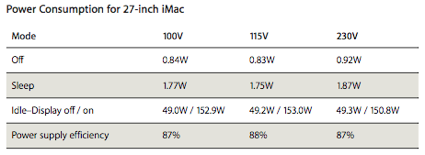
Excellent figures!
I’m going to de-clutter my desktop and pass on the 17” MBP and the (classic!) 23” Cinema Display to the other two members of the family. I no longer need a mobile solution to carry everything I do with me, and there are better ways to do things on the move nowadays, than carrying a great-but-bulky laptop around.
Excellent figures!
I’m going to de-clutter my desktop and pass on the 17” MBP and the (classic!) 23” Cinema Display to the other two members of the family. I no longer need a mobile solution to carry everything I do with me, and there are better ways to do things on the move nowadays, than carrying a great-but-bulky laptop around.
The Jee Lab
2020-03-15
This weblog has been slowing down for some time now,
as you probably have noticed. The reason is that I’ve
been shifting gears to a new (but not necessarily
disjunct) direction. These past few months I’ve been
involved in a number of new projects dealing with
“Physical Computing”. Tiny / cheap
hardware has become very powerful these days,
and the revolution is that these are both very
easy to interface to the real world through
sensors and actuators and that the whole thing
can be programmed in standard C / C++ using gcc.
I stumbled upon that new world last year, and decided to really get into it. In a distant past, long before the PC was invented, I used to build (and blow up) amplifiers, then simple digital circuits, then crude microprocessors - so it’s really all a fascinating bridge back to the past. I’ve been interested in getting to grips with energy consumption around the house for quite some time now, and all of a sudden there is this technology which makes it possible, affordable, and fun!
Lots of people seem to be getting into this now. It’s not likely that someone will come up with something as advanced as an iPhone - but what’s so amazing is that the technology is essentially the same. The playing field is leveling out to an amazing degree, because now just about anyone can get into exploring, designing, and developing hardware (and the firmware / software that makes it do things, which is usually the bigger challenge).
Anyway, in an attempt to create a structure for myself, I’ve set up the Jee Lab - a weblog and a physical area in my office to explore and learn more about this new world. If you’re interested, you’re welcome to track my progress there. It’s all open - open source, open hardware, open hype? ... whatever.
This weblog is the spot where I will continue to post all other opinions, ideas, and things of interest - as well as news regarding the software projects which remain as near and dear to me as ever: Metakit, Tclkit, Vlerq, and more.
I stumbled upon that new world last year, and decided to really get into it. In a distant past, long before the PC was invented, I used to build (and blow up) amplifiers, then simple digital circuits, then crude microprocessors - so it’s really all a fascinating bridge back to the past. I’ve been interested in getting to grips with energy consumption around the house for quite some time now, and all of a sudden there is this technology which makes it possible, affordable, and fun!
Lots of people seem to be getting into this now. It’s not likely that someone will come up with something as advanced as an iPhone - but what’s so amazing is that the technology is essentially the same. The playing field is leveling out to an amazing degree, because now just about anyone can get into exploring, designing, and developing hardware (and the firmware / software that makes it do things, which is usually the bigger challenge).
Anyway, in an attempt to create a structure for myself, I’ve set up the Jee Lab - a weblog and a physical area in my office to explore and learn more about this new world. If you’re interested, you’re welcome to track my progress there. It’s all open - open source, open hardware, open hype? ... whatever.
This weblog is the spot where I will continue to post all other opinions, ideas, and things of interest - as well as news regarding the software projects which remain as near and dear to me as ever: Metakit, Tclkit, Vlerq, and more.
Paperless progress
2020-02-14
DEVONthink Pro Office is one of
many in the very crowded space of document
organizers / archivers. They announced the 2.0
beta a while back which caused me to look at it
again. And just now, there was a 2.0b3 release
with a long-awaited OCR upgrade. I was already
sold and bought a license last year. I also have
a Fujitsu ScanSnap S510M, which all by itself
combines a great set of features into a
very effective workflow.
Well... DTPO 2.0b + S510M are P H E N O M E N A L when used together.
It scans all my paper, from doodles to invoices to books. It converts text and inserts it invisibly into the PDF with all text indexed / searchable (and the big news in 2.0b3 is that the resulting PDF sizes are excellent). And now the biggie: DT can take these documents and auto-categorize them into different folders which already contain a few example documents.
So the workflow is: insert paper, push button, insert paper, push button, etc. Then as each OCR completes: enter some title (I just enter the main name / keyword, duplicate titles are fine). Finally, auto-categorize all documents in the inbox, and voilá; everything has been filed for eternity.
You can create “replicas” in DT to place a document in multiple folders, very much like a Unix hard link.
There’s a scriptlet which can be installed in Safari as bookmark, and since I’ve added it as 3rd item on my bookmarks bar, CMD+3 creates a web archive of the current page in DT (even with the bookmark bar hidden). There are also Dashboard widgets.
Again: auto-categorize puts these captured pages in a folder with documents most like it. And of course all documents can be found regardless of how they are organized, by entering a few characters in DT’s search box.
Did I mention how unbelievably effective this all is? Oh, yeah, I did ;)
PS. Other recent discovery I’ve started using heavily is DropBox. Syncing done right (uses Amazon’s S3). Bonus feature is automatic photo galleries, such as this one.
Well... DTPO 2.0b + S510M are P H E N O M E N A L when used together.
It scans all my paper, from doodles to invoices to books. It converts text and inserts it invisibly into the PDF with all text indexed / searchable (and the big news in 2.0b3 is that the resulting PDF sizes are excellent). And now the biggie: DT can take these documents and auto-categorize them into different folders which already contain a few example documents.
So the workflow is: insert paper, push button, insert paper, push button, etc. Then as each OCR completes: enter some title (I just enter the main name / keyword, duplicate titles are fine). Finally, auto-categorize all documents in the inbox, and voilá; everything has been filed for eternity.
You can create “replicas” in DT to place a document in multiple folders, very much like a Unix hard link.
There’s a scriptlet which can be installed in Safari as bookmark, and since I’ve added it as 3rd item on my bookmarks bar, CMD+3 creates a web archive of the current page in DT (even with the bookmark bar hidden). There are also Dashboard widgets.
Again: auto-categorize puts these captured pages in a folder with documents most like it. And of course all documents can be found regardless of how they are organized, by entering a few characters in DT’s search box.
Did I mention how unbelievably effective this all is? Oh, yeah, I did ;)
PS. Other recent discovery I’ve started using heavily is DropBox. Syncing done right (uses Amazon’s S3). Bonus feature is automatic photo galleries, such as this one.
Plugstupid
2020-12-01
Today, the “Plugwise” system was delivered to me.
It’s a system with plugs (they call ‘em “circles”)
which you place between an appliance and the power
socket in the wall. Plug the included USB stick into
a (Windows) PC and you end up with a system which can
track power usage of each plug and even remotely
switch each one on or off, manually or automatically
based on some rules. So when you switch off the PC,
you could switch off the monitor, or a printer in
some other room perhaps. Sounds good.
But they managed to mess up in awful ways:
I’m not amused. This is hardware after all, so software protection all the way to obtaining my email address and insisting on internet connectivity and over-the-net activation is totally over the top, if you ask me. I’m happy to have these plugs now to monitor exact power consumption around the house and I sure intend to use them fully - but this approach is stupid.
These plugs made me wiser indeed, but probably not quite in the way the manufacturer intended...
Update: just got the confirmation email. Ok, so it took 15 minutes... my point is that this shouldn’t have been required in the first place.
But they managed to mess up in awful ways:
- plugs don’t have a pushbutton, so turning a plug back on requires going to the controlling PC
- the system comes with a CD, which then insists on an internet connection and installs over the net
- you have to register with a code printed on that same CD (not the box, the actual disk)
- you must enter personal info, at least an email address anyway
- by default, a checkbox is set which grants permission to PW to obtain your power usage data
- and then... you’re told that you’ll get an email unlocking the “source” application
- (calling an application “source”, when it is anything but, is somewhat confusing for IT people)
- without that activation, the software barfs and exits
I’m not amused. This is hardware after all, so software protection all the way to obtaining my email address and insisting on internet connectivity and over-the-net activation is totally over the top, if you ask me. I’m happy to have these plugs now to monitor exact power consumption around the house and I sure intend to use them fully - but this approach is stupid.
These plugs made me wiser indeed, but probably not quite in the way the manufacturer intended...
Update: just got the confirmation email. Ok, so it took 15 minutes... my point is that this shouldn’t have been required in the first place.
Glitch
2020-10-17
FWIW, the www.equi4.com web server
stopped working on [13/Oct/2020:10:46:52
+0000] and resumed on [16/Oct/2020:14:53:44
+0000] after I restarted everything. All I
noticed was a runaway Tclkit process, eating up all
CPU cycles. Subversion and other ports were
unaffected.
Weird.
Thanks to everyone who reported this - I’ve been out of the country (and offline) for a few days, hence the delay in fixing this.
Weird.
Thanks to everyone who reported this - I’ve been out of the country (and offline) for a few days, hence the delay in fixing this.
Netbook
2020-10-09
Here’s what 15 years or so does to laptop technology:
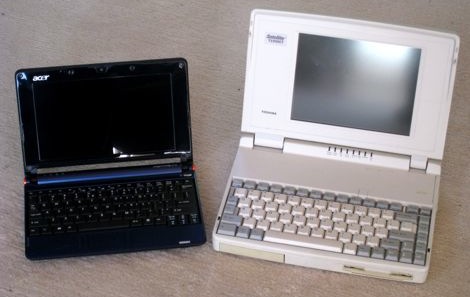
On the left: 1.6 GHz Atom, 512 Mb RAM, 8 Gb SSD, 1024x600.
On the right: 25 MHz 486SX, 10 Mb RAM, 200 Mb HD, 640x480.
Here’s another size comparison, with a 17” MacBook Pro (Core 2 Duo) this time:
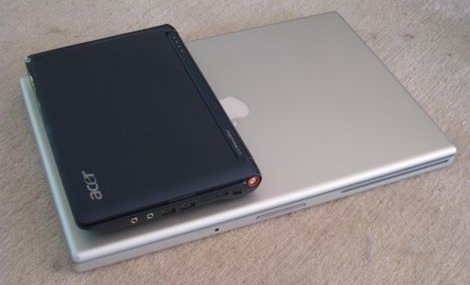
Mac: cost 10x, CPU speed 4x. Tosh & Mac both weigh 3x the A110L netbook.
On the left: 1.6 GHz Atom, 512 Mb RAM, 8 Gb SSD, 1024x600.
On the right: 25 MHz 486SX, 10 Mb RAM, 200 Mb HD, 640x480.
Here’s another size comparison, with a 17” MacBook Pro (Core 2 Duo) this time:
Mac: cost 10x, CPU speed 4x. Tosh & Mac both weigh 3x the A110L netbook.
The JavaScript race
2020-09-19
There sure is a lot going on with JavaScript these
days: first v8 - Google’s new OSS
implementation, and now SFX - the next incarnation of
WebKit’s SquirrelFish. Here’s a comparison of a couple of
implementations:
SquirrelFish Extreme: 943.3 ms, V8: 1280.6 ms, TraceMonkey: 1464.6 ms
Given the fact that JS is part of just about every web browser by now, it looks like this modern dynamic, ehm... scripting language is becoming seriously mainstream.
SquirrelFish Extreme: 943.3 ms, V8: 1280.6 ms, TraceMonkey: 1464.6 ms
Given the fact that JS is part of just about every web browser by now, it looks like this modern dynamic, ehm... scripting language is becoming seriously mainstream.
About Lua
2020-09-12
This
interview with
Lua’s designer is refreshingly to-the-point. The
last paragraph is worth repeating in full
here:
That last sentence says it all. It implies learning several languages well - not just skimming them to pick on some perceived flaw. All major programming languages are trade-offs, and more often than not incredibly well thought-out. To put it differently: if you can’t find an aspect of language X at which it is substantially better than what you’re using most of the time, then you haven’t understood X.
More seriously, I really subscribe to the idea that "if the only tool you have is a hammer, you treat everything like a nail". So, programmers should learn several languages and learn how to use the strengths of each one effectively. It is no use to learn several languages if you do not respect their differences.
That last sentence says it all. It implies learning several languages well - not just skimming them to pick on some perceived flaw. All major programming languages are trade-offs, and more often than not incredibly well thought-out. To put it differently: if you can’t find an aspect of language X at which it is substantially better than what you’re using most of the time, then you haven’t understood X.
Darwine
2020-05-18
Darwine is Wine on Darwin. In plain english:
running Windows apps on Mac OSX without
a VM, i.e. without installing Windows on a
virtual disk.
The 1.0rc1 release of Wine is very easy to install (I did a full build from source, as described here, which builds a dmg), with the usual "drag the app (a folder in this case) to the Applications folder". Everything appears to be neatly tucked away in a 67 Mb app bundle. I set up MacOSX so that all files with extension ".exe" launch WineHelper. And that's it - exe files become double-clickable and they... work. Pretty amazing stuff.
Behind the scenes, Darwine launches X11 for the gui, and opens two more windows: a process list and a console log.
I tried Pat Thoyt's Tclkit 8.4 and 8.5 builds and they work - Tk and all. There is a quirk with both of them that stdout, stderr, and the prompt end up on the console, but that's about it. Apps run on drive Z: which is the Mac file system, so everything is available.
This is fascinating. Maybe the time has come to try running MSVC6 straight from MacOSX. It would be great to automate builds from a normal command-line environment, running only a few apps on Win32 (i.e. msvc6's "cl.exe") and staying with TextMate, bash, make, as usual.
I just moved my Vista VM off to a secondary disk, reclaiming over 10 Gb of disk space filled with something that taxes my patience and strains the Mac (1 Gb RAM allotted to VMware and it still crawls). Having Win98, WIn2k, and WinXP VM's is enough of a hassle: I just tried upgrading XP to SP3 and it failed because 700 Mb of free space wasn't enough. Why didn't a quick disk check before the install warn me? Actually, the real question is: why is a 4 Gb virtual disk too small to comfortably run XP?
Darwine & Wine really deserve to succeed IMO. So that I can treat Windows as a legacy OS. And get back to fun stuff.
The 1.0rc1 release of Wine is very easy to install (I did a full build from source, as described here, which builds a dmg), with the usual "drag the app (a folder in this case) to the Applications folder". Everything appears to be neatly tucked away in a 67 Mb app bundle. I set up MacOSX so that all files with extension ".exe" launch WineHelper. And that's it - exe files become double-clickable and they... work. Pretty amazing stuff.
Behind the scenes, Darwine launches X11 for the gui, and opens two more windows: a process list and a console log.
I tried Pat Thoyt's Tclkit 8.4 and 8.5 builds and they work - Tk and all. There is a quirk with both of them that stdout, stderr, and the prompt end up on the console, but that's about it. Apps run on drive Z: which is the Mac file system, so everything is available.
This is fascinating. Maybe the time has come to try running MSVC6 straight from MacOSX. It would be great to automate builds from a normal command-line environment, running only a few apps on Win32 (i.e. msvc6's "cl.exe") and staying with TextMate, bash, make, as usual.
I just moved my Vista VM off to a secondary disk, reclaiming over 10 Gb of disk space filled with something that taxes my patience and strains the Mac (1 Gb RAM allotted to VMware and it still crawls). Having Win98, WIn2k, and WinXP VM's is enough of a hassle: I just tried upgrading XP to SP3 and it failed because 700 Mb of free space wasn't enough. Why didn't a quick disk check before the install warn me? Actually, the real question is: why is a 4 Gb virtual disk too small to comfortably run XP?
Darwine & Wine really deserve to succeed IMO. So that I can treat Windows as a legacy OS. And get back to fun stuff.
Silence
2020-04-29
People who've visited me at home know that I'm a huge
fan of total silence. I've taken considerable steps
to end up with an office which is totally
quiet (and consumes virtually no power as a nice
side-effect). An obvious tip: turn off what you don't
constantly need. Better still: make stuff turn off by
itself after a certain time. Slightly less obvious
but very effective: use 2.5" USB-powered external
HD's where possible (on my NSLU2-based server, and
attached to my MacBook Pro for Time Machine backups).
Disk capacity is no longer an issue.
As I said, the result is perfect - and music is fun again, even at a very low volume.
Which makes this post hilarious ;)
As I said, the result is perfect - and music is fun again, even at a very low volume.
Which makes this post hilarious ;)
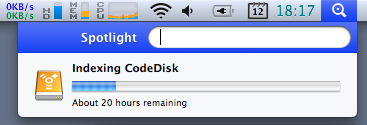
Too heavy for Spotlight?
2020-02-12

RAID + backup
2020-02-11
I've solved the problem of having robust storage both
on- and off-line: RAID 1 over 3 disks with a
write-intent bitmap.
Let me explain. I've been moving more and more information to disk lately, scanning in books and de-duplicating all cdrom/dvd backups (we had all our vinyl and negatives digitized a while back). Takes only 250 Gb so far, not counting mp3's/m4v's that is (which have less uniqueness value to me). See this NYT article - where Brewster Kahle summarizes it well: "Paper is no longer the master copy; the digital version is".
But with bits, particularly if some of 'em are in compressed files, data integrity is a huge issue. Which is where RAID makes sense. So I got two big SATA disks, hooked them up to trusty old "teevie", a 6 year old beige box stashed away well out of sight and hearing. With RAID 1 mirroring, everything gets written to both disks, so if either one fails: no sweat.
But RAID does not guard against fire or theft or "rm -r". It's a redundancy solution, not a backup mechanism. I want to keep an extra copy around somewhere else, just in case. Remote storage is still more expensive than yet another disk, and then you need encryption to prevent unauthorized access. Hmm, I prefer simple, as in: avoid adding complexity.
So now I'm setting up RAID to mirror over three disks. The idea being that you can run RAID 1 just fine in "degraded" mode as long as there are still 2 working disks in the array. Once in a while I will plug in the third disk, let the system automatically bring it in sync with the rest, and then take it out and move it off-site again.
But the story does not end here. Bringing a disc up to date is the same as adding a new disk: RAID will do a full copy, taking many hours when the disks are half a terabyte each. Which is where the "write-intent bitmap" comes in: it tracks the blocks which have not been fully synced to all disks yet. Whenever a block is known to be in sync everywhere, its bit is cleared. What this means is that I can now put all three disks in, let them do their thing, and after a while the bitmap will be all clear. Once I pull out the third disk, bits will start accumulating as changes are written to the other two. Later, when putting the third disk back on-line, the system will automatically save only the changed blocks. No need to remember any commands, start anything, just put it on-line. Quick and easy!
If a disk fails: buy a new one, replace it, done. Every few months, I'll briefly insert the third disk and then safely store it off-site again. If I were to ever mess up really badly (e.g. "rm -r"), I can revert via the third one: mark the two main disks as failed, and put the third one in for recovery to its older version.
Methinks it's the perfect setup for my needs. Total cost under €300 for the disks plus cheapo drive bays. Welcome to the digitalization decade.
Let me explain. I've been moving more and more information to disk lately, scanning in books and de-duplicating all cdrom/dvd backups (we had all our vinyl and negatives digitized a while back). Takes only 250 Gb so far, not counting mp3's/m4v's that is (which have less uniqueness value to me). See this NYT article - where Brewster Kahle summarizes it well: "Paper is no longer the master copy; the digital version is".
But with bits, particularly if some of 'em are in compressed files, data integrity is a huge issue. Which is where RAID makes sense. So I got two big SATA disks, hooked them up to trusty old "teevie", a 6 year old beige box stashed away well out of sight and hearing. With RAID 1 mirroring, everything gets written to both disks, so if either one fails: no sweat.
But RAID does not guard against fire or theft or "rm -r". It's a redundancy solution, not a backup mechanism. I want to keep an extra copy around somewhere else, just in case. Remote storage is still more expensive than yet another disk, and then you need encryption to prevent unauthorized access. Hmm, I prefer simple, as in: avoid adding complexity.
So now I'm setting up RAID to mirror over three disks. The idea being that you can run RAID 1 just fine in "degraded" mode as long as there are still 2 working disks in the array. Once in a while I will plug in the third disk, let the system automatically bring it in sync with the rest, and then take it out and move it off-site again.
But the story does not end here. Bringing a disc up to date is the same as adding a new disk: RAID will do a full copy, taking many hours when the disks are half a terabyte each. Which is where the "write-intent bitmap" comes in: it tracks the blocks which have not been fully synced to all disks yet. Whenever a block is known to be in sync everywhere, its bit is cleared. What this means is that I can now put all three disks in, let them do their thing, and after a while the bitmap will be all clear. Once I pull out the third disk, bits will start accumulating as changes are written to the other two. Later, when putting the third disk back on-line, the system will automatically save only the changed blocks. No need to remember any commands, start anything, just put it on-line. Quick and easy!
If a disk fails: buy a new one, replace it, done. Every few months, I'll briefly insert the third disk and then safely store it off-site again. If I were to ever mess up really badly (e.g. "rm -r"), I can revert via the third one: mark the two main disks as failed, and put the third one in for recovery to its older version.
Methinks it's the perfect setup for my needs. Total cost under €300 for the disks plus cheapo drive bays. Welcome to the digitalization decade.
New?
2020-01-10
There's something odd when you see a new
gadget announced on a geek site ... which we've had in the
house for some two years now:
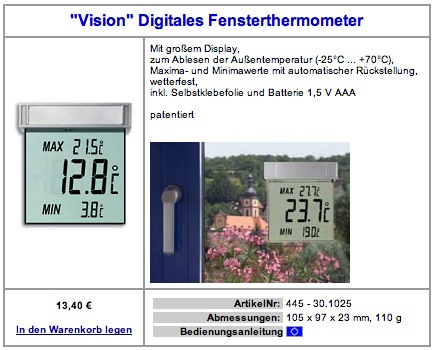
See http://www.wettershop.de/ under Designprodukte/Thermometer. It sticks on the outside of a window, BTW.
See http://www.wettershop.de/ under Designprodukte/Thermometer. It sticks on the outside of a window, BTW.
No more backups
2007-11-17
There is a feature in Mac OS X 10.5 which gets
mentioned a lot lately: Time Machine. Unfortunately,
Apple has done a good job of grabbing everyone's
attention with the user interface of this thing,
but the key advance is not the looks
but the inner workings of it all. What
TM does, is maintain hourly/daily/weekly rolling
backups. Which is great, except that until now
you always had to somehow keep system load and
disk usage in check. So normally this approach
simply doesn't scale well enough to be used on
an entire disk, no matter how clever you wrap up
rsync, etc. Which means you end up with a
diverse set of backup strategies. Messy,
tedious, and brittle, alas.
Well, times have changed. TM is revolutionary, because its overhead is proportional to the amount of change. Every hour, my (quiet) external HD spins up, rattles for a few seconds, and then spins down again after 5 minutes (not 10, see "man pmset"). All you need is a disk with say 2..3x as much free space as the backed-up area. One detail to take care of is to not include big changing files such as VMware/Parallels disk images and large active databases in the backup, because TM backs up per file. So I put all those inside /Users/Shared and exclude that entire area.
Oh, and TM does the right thing: it suspends and resumes if its external disk is off-line for a while, such as with a laptop on the road.
Note that attached disks cannot protect from malicious software and major disasters such as a fire - but this is something an occasional swap with an off-site disk can take care of.
I no longer "do" backups. I plugged external disks into the two main Macs here and TM automatically asked for permission to use them. End of story.
Well, times have changed. TM is revolutionary, because its overhead is proportional to the amount of change. Every hour, my (quiet) external HD spins up, rattles for a few seconds, and then spins down again after 5 minutes (not 10, see "man pmset"). All you need is a disk with say 2..3x as much free space as the backed-up area. One detail to take care of is to not include big changing files such as VMware/Parallels disk images and large active databases in the backup, because TM backs up per file. So I put all those inside /Users/Shared and exclude that entire area.
Oh, and TM does the right thing: it suspends and resumes if its external disk is off-line for a while, such as with a laptop on the road.
Note that attached disks cannot protect from malicious software and major disasters such as a fire - but this is something an occasional swap with an off-site disk can take care of.
I no longer "do" backups. I plugged external disks into the two main Macs here and TM automatically asked for permission to use them. End of story.
Security?
2007-07-13
Installed Vista Ultimate under VMware Fusion today
(do I need it? no, but it's good to know a bit about
it and for testing) - it nearly fills an 8 Gb disk
image, and it gobbles up 1 Gb of RAM. I won't bore
you with my opinion on those two facts...
VMware has a quick setup whereby it asks your name and a password and then lets the whole setup run with no further questions asked. After the whole install process, the system comes up logged in and ready to go - which is great.
Except that I did not enter a password, which leads to a system which does an auto-login with a password I do not know. It's definitely not the empty string. I don't even know who is to blame, VMware or Vista... After trying a few things and googling a bit, I was about to conclude that a full re-install would be my only option. No info on special boot keys to bypass/reset things, the built-in help says you need to know the admin password (or have a rescue disk, which... needs an admin password to be created). It all makes sense of course, but I wasn't getting anywhere with all this and left with a setup I couldn't administer.
But guess what: as admin, you can create a new user with admin rights, and it doesn't ask for your password! So I created a temporary user with full admin rights and with a known password, and switched to it. Then I reset the original admin's password - bingo. Did this after all the latest updates were applied, btw.
In other words: anyone can do anything on a machine running Vista if the current user is an administrator, without ever having to re-confirm the knowledge of that admin's password: simply create another admin and switch to it.
Pinch me. How many years has Vista been in development? How long has it been out as official release? On how many systems has it been installed?
VMware has a quick setup whereby it asks your name and a password and then lets the whole setup run with no further questions asked. After the whole install process, the system comes up logged in and ready to go - which is great.
Except that I did not enter a password, which leads to a system which does an auto-login with a password I do not know. It's definitely not the empty string. I don't even know who is to blame, VMware or Vista... After trying a few things and googling a bit, I was about to conclude that a full re-install would be my only option. No info on special boot keys to bypass/reset things, the built-in help says you need to know the admin password (or have a rescue disk, which... needs an admin password to be created). It all makes sense of course, but I wasn't getting anywhere with all this and left with a setup I couldn't administer.
But guess what: as admin, you can create a new user with admin rights, and it doesn't ask for your password! So I created a temporary user with full admin rights and with a known password, and switched to it. Then I reset the original admin's password - bingo. Did this after all the latest updates were applied, btw.
In other words: anyone can do anything on a machine running Vista if the current user is an administrator, without ever having to re-confirm the knowledge of that admin's password: simply create another admin and switch to it.
Pinch me. How many years has Vista been in development? How long has it been out as official release? On how many systems has it been installed?
Off-site storage
2007-06-26
Just came across an interesting utility called
JungleDisk. It creates a virtual
disk on the desktop which is automatically
encrypted and backed up to Amazon's S3 service. The disk uses local
storage as cache for fast local use, and is
accessed via WebDAV - which is how it can figure
out what to send to S3 in the background. It
only sends changes, AFAICT. This looks like an
eminently practical solution - even for larger
datasets, such as a personal photo collection.
Haven't used it - beyond a quick tryout. JD only caches files up to a (configurable) limit, the rest gets pulled from S3. Also, it looks like offline mode is not supported (yet, apparently) - though setting the cache big enough to always hold everything might do the trick.
Haven't used it - beyond a quick tryout. JD only caches files up to a (configurable) limit, the rest gets pulled from S3. Also, it looks like offline mode is not supported (yet, apparently) - though setting the cache big enough to always hold everything might do the trick.
The browser
2007-05-09
To follow up on my Flex
lock-in post, see this article: the language of the
future could indeed be JavaScript.
This does not imply what we should all jump ship and move to JS - just like Windows being dominant is no reason to adopt it.
This does not imply what we should all jump ship and move to JS - just like Windows being dominant is no reason to adopt it.
Dead pixel
2007-04-27
Not so long ago, one of my Mac's pixels went black.
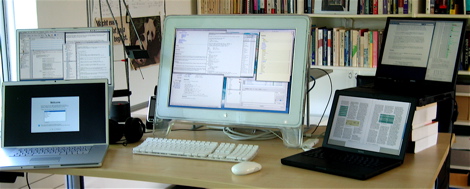
Fortunately, the other 7,857,999 are ok :)
Fortunately, the other 7,857,999 are ok :)
Flex lock-in
2007-04-26
Adobe's Flex provides a way to push
XML-based "code" from a server into a Flash
player running on the browser. There's a nice
online demo. It looks like a useful
approach - the Flash player is nearly ubiquitous
by now.
I can't help but think that the Tk browser plugin could have filled this spot ages ago. And much more, by now.
The news is that Flex will be open sourced before the end of the year. Think about it: open source code, written for a presentation engine that is fully controlled by Adobe. Clever. It's not easy to come up with scenario's whereby you get to lock-in open source developments.
In other words: to conquer the world, get into the browser. JavaScript and Flash did. Is everything else becoming irrelevant?
Update: another player in this field is Microsoft with Silverlight.
I can't help but think that the Tk browser plugin could have filled this spot ages ago. And much more, by now.
The news is that Flex will be open sourced before the end of the year. Think about it: open source code, written for a presentation engine that is fully controlled by Adobe. Clever. It's not easy to come up with scenario's whereby you get to lock-in open source developments.
In other words: to conquer the world, get into the browser. JavaScript and Flash did. Is everything else becoming irrelevant?
Update: another player in this field is Microsoft with Silverlight.
New disk
2006-11-23
Disk failures
2006-11-02
Yesterday, the system disk of "teevie", my AMD64
Linux box (which also hosts a range of other OS'es as
VMware images) started running into hard disk errors.
The drive was getting terribly hot, so I took it out of the 3.5" drive slot to get some more free-air cooling. Problems went away long enough to recover all partitions with a couple of restarts (and many hours of patience). Thank you Knoppix and rsync, for being there when I needed you.
As it so happens today a big new external HD arrived (Maxtor OneTouch III), so I have been busy making full backups of all the main machines around here. No fun, but I guess I got away with the occasional when-I-think-of-it full backup style I've been doing for years now. It's not the work lost that I fear (I really do backup my active files a lot), but the amount of time it takes to restore a well-running system after serious hardware failures. Copying these big disks takes forever.
The failing IBM Deskstar 120 Gb drive worked for about 5 years without a hitch, so it really did well. Luckily, there's a spare 80 Gb around here which can take its place - but it sure takes a lot of time to shove those gigs around and get all the settings just right again!
The drive was getting terribly hot, so I took it out of the 3.5" drive slot to get some more free-air cooling. Problems went away long enough to recover all partitions with a couple of restarts (and many hours of patience). Thank you Knoppix and rsync, for being there when I needed you.
As it so happens today a big new external HD arrived (Maxtor OneTouch III), so I have been busy making full backups of all the main machines around here. No fun, but I guess I got away with the occasional when-I-think-of-it full backup style I've been doing for years now. It's not the work lost that I fear (I really do backup my active files a lot), but the amount of time it takes to restore a well-running system after serious hardware failures. Copying these big disks takes forever.
The failing IBM Deskstar 120 Gb drive worked for about 5 years without a hitch, so it really did well. Luckily, there's a spare 80 Gb around here which can take its place - but it sure takes a lot of time to shove those gigs around and get all the settings just right again!
VoodooPad
2006-09-28
Convergence
2006-02-09
The
Slimserver is an MP3 jukebox which plays nice with
iTunes music collections (and it does not require a
Squeezebox player to be useful). Works nicely (coded
in Perl, not deployed as Starkit, oh well). And now
it looks like the Nokia 770 could become a
nice
front-end for it.
When I have time for it, am having way too much fun with Vlerq right now!
When I have time for it, am having way too much fun with Vlerq right now!
Humanoid
2005-12-14
Seeing
these movies
gives me a
very odd sensation. How can this little machine look
so "real"? Amazing achievement. It all looks benign,
for now...
Safe sleep
2005-12-04
The Apple
Powerbook is now able to do a hybrid
suspend/hibernate, as described in
this article. What it
means is that nothing changes in the normal case. But
even if a battery runs flat (mine have been losing
capacity over the years), saved state is not
compromised: startup will still
bring it
back.
I love that second smile effect. This is what creates a truly loyal customer base.
I love that second smile effect. This is what creates a truly loyal customer base.
PowerGUI
2005-11-29
An example
of how Quicksilver
and a
web-based system can be used together. The video
mentioned on this
page illustrates
the workflow dynamics of it all. I'm still looking
for ways to get more of my computer work streamlined,
and mice just don't cut it: no way to automate things
into your spinal cord (read: effortlessly) when it
takes aiming and visual feedback to get anything
done.
Darwinports GUI
2005-11-09
DarwinPorts
is a
collection of nearly 3000 ports of various Unix/Linux
software packages for Mac OS X. And there's a GUI for
it, called Port
Authority. Written in
Tcl. Looking inside, PA appears to be using Tk, Tile,
Tablelist, and Critcl - cool!
No[kia] brainer
2005-11-08
CVStrac
2005-10-06
CVSTrac is a
bug tracking system tied to CVS which is delightfully
simple to set up and use: there's a self-contained
static executable for Linux which works right out of
the box. Written by Richard Hipp, author of SQLite
(which is used in CVSTrack). Absolutely top notch.
G5 vs. X86, OSX vs Linux
2005-06-04
A
comparison which
confirms what I've been seeing, but for which I never
had any real data to back it up: the Mac is not as
snappy at the core level as a Linux/x86 combo.
Wouldn't ever want to go back to anything else though
- in terms of helping me get the work done, my 1 GHz
PowerBook remains in a league of its own.
NanoBlogger
2005-04-19