There's an application by Richard Suchenwirth called TclWorld [1] with a nice demo of drawing a world map and letting you zoom around there and view country/city/flag details. Here's a screenshot (of an early version, running on WinCE):
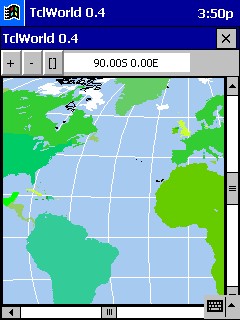
How to get TclWorld running on Windows
- download the TclWorld application from http://mini.net/sdarchive/tclworld.kit (330 Kb)
- download TclKit for Windows from /pub/tk/tclkit-win32.upx.exe (900 Kb)
- drag and drop "tclworld.kit" onto "tclkit-win32.upx.exe"
That's it, you are looking at TclWorld... an application written in Tcl/Tk and packaged as a Starkit.
See also: Where to find starkits - How to use a starkit - How to assemble a starkit - Getting started on Unix
Updated on 11 Jul 2002, 15:16 GMT
Search - Recent Changes - 2 References - About WiKit - Go to Starkit - Help